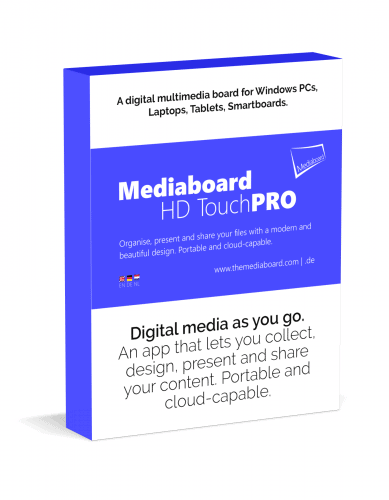
Mediaboard PRO

Mediaboard – Download EN

By

Mediaboard 3 goes cross-platform

Get Ready for v3…
Something super exciting is coming!

We’re currently tweaking Mediaboard to deliver a feature-packed app that will be available as Mediaboard Touch 3 for Windows, Mac OS and Linux. Customer feedback and the demand for a cross platform app has inspired us to launch this new development phase with Electron.

The current Mediaboard 2.7 PRO is still available. Just let us know your name and email and we will send you the download links. Free!


    · · ·
    Many additions and improvements in Mediaboard 2.7
    More card effects like fade, pulse, rotate, outlines, fill, solo
    Multiple video pop-ups » Run videos simultaneously in pop-up windows
    Card Effects Panel » Easily add short codes to cards for cool card effects
    Powerful Search » Search all content across your board and jump in
    Custom Styles » Every category and cards can have a separate design
    Random Colours » Mediaboard can generate cool color effects on cards
    Autoload Category » Define a category that starts with your board
    Touch Sound » Play any sound on touch without loading a player
    Quick Control Panel » Quickly access the most used board functions
    Popup Elements » Display multiple texts, images or videos on screen
    Master and Client » Share your board with others and keep control
    Playlists » Open multiple videos, images or webpages at once
    Category Owner » Create private categories or let others see or edit
    Run from Network » Open Mediaboard from a file share in your network
    Split Pop-Ups » Change word positions of a sentence while learning
    Skip pop-up texts » Play card media directly without its pop-up info text
    Copy & Paste cards » Copy cards and send them via email or messenger
    Get Mediaboard HD Touch PRO 2.7 for free!

    1
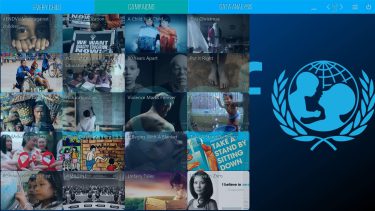
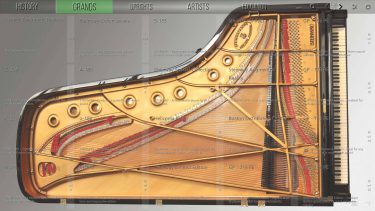
    Categories are the top level structure for your board. Learn more about categories
    2
    Projects, files and links display as cards.Learn more about cards
    3
    In the Settings Panel find all options for your board. Learn More about the Settings Panel
    4
    Effortless functionality with touch, keyboard and mouse. Learn More about functionality
    5
    Multiple colour and style options to create your own board designs. Learn more about styling options
    6
    Distribute your board on USB and other storage devices. Learn more about sharing
    7
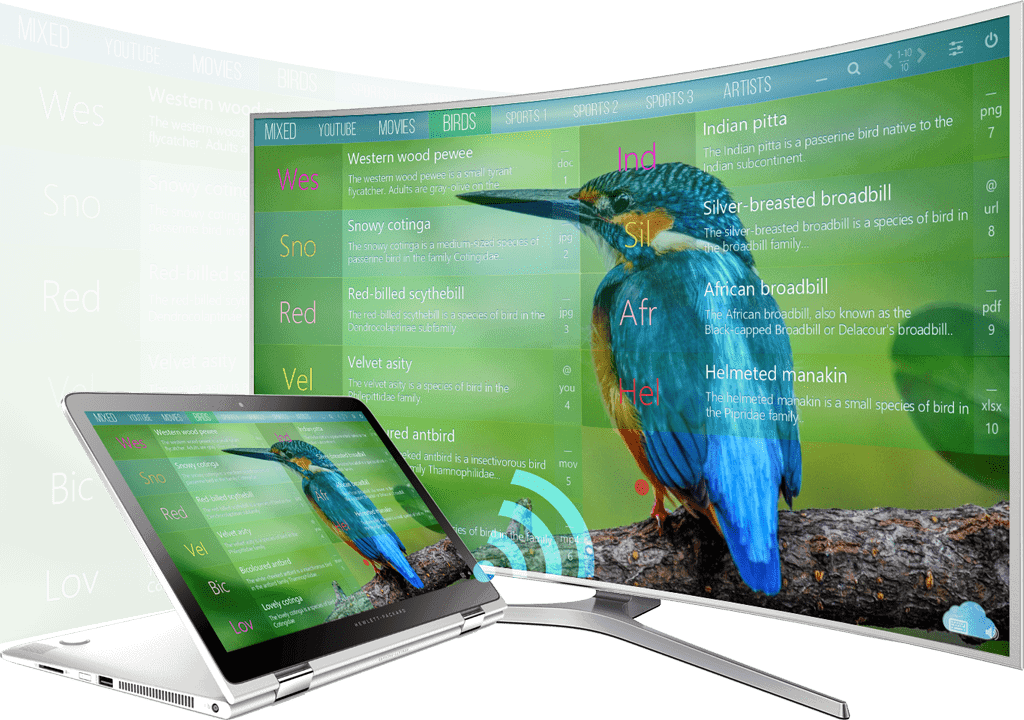
    Stream your board on a wallscreen or smart TV or beam it in HD on a projection screen. Learn more about streaming
    8
    Use Mediaboard in the cloud as a streamlined interface for all users. Learn more about Mediaboard in the cloud

    Main features Mediaboard PRO 2.7

    • Windows desktop app that runs locally or on a network
    • No subscription, no ads. Free for private and educational use.
    • Contact us if you want to use Mediaboard commercially.
    • 4 inclusive copies
    • 150 cards per category
    • Customisable board design
    • Lock settings with password
    • Portable and cloud-capable
    • Content Packages export/import
    • Help Bubble Layer
    • Master and Client Boards (Cloud)
    • Multilingual (English/German)
    • Free updates
    • More PRO features

    Mediaboard HD Touch PRO 2.7 License

    • The Mediaboard PRO license is a non-expiring license with free updates and upgrades.
    • The PRO license entitles you to private and educational use.
    • Contact us for an individual license if you want to use Mediaboard commercially.
    • Copy an original board at no extra cost 4 times (1:1 inclusive copy).

    How Do I Download and Start Mediaboard?

    How To Download and Start

    Download and Start

    1. Install using Setup.exe

    You can install Mediaboard like a normal Windows program. It still remains portable and can be copied using the Easy Share function or directly from the Applications folder.

    1. Download and start the file Mediaboard-Setup.exe (FREE or PRO).
    2. Follow the installation instructions.
    3. After installation, you will find Mediaboard FREE in your Start menu and on your desktop.

    2. Download as Folder

    If you do not want to use the Mediaboard Installer, you can also download Mediaboard as a packed folder.

    1. Download and unzip the file Mediaboard-Zip.zip.
    2. Open the unzipped Mediaboard folder and start the file Mediaboard.exe.
    3. If you now minimize the app, then you will find the Mediaboard icon in the task bar and can pin it with a right mouse click.

    Possible notifications the first time you start Mediaboard

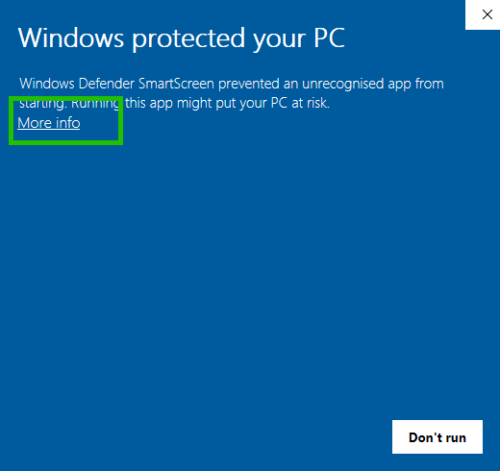
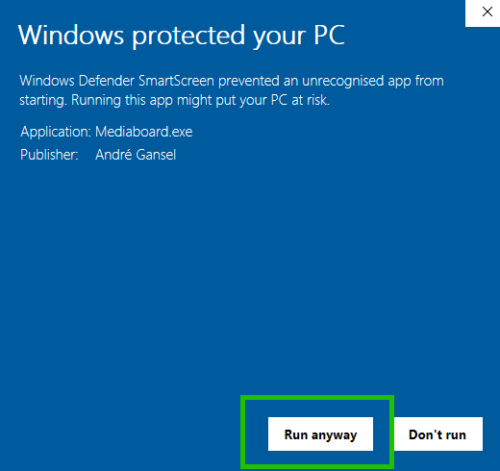
    Windows SmartScreen.

    1. Click on More info
    2. Click on Run anyway to start using Mediaboard.


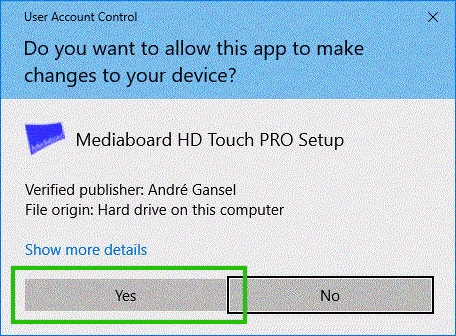
    User Account Control

    1. Select ´Yes´to proceed.
    2. Mediaboard´s start up process will continue.

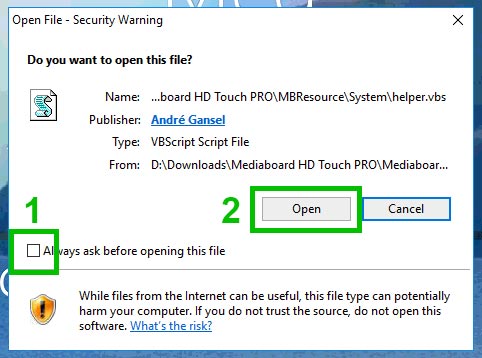
    VBS notification

    1. Untick the ´Always ask´ option.
    2. Click Ópen´to start using Mediaboard.

    Statement: Downloading Mediaboard to Drive C: or to the Programs Folder might fail if you do not have administrator rights on the computer.

    Content-on-Demand

    Mediaboard Content Packages

    Mediaboard Content Packages are a straight forward way of receiving and delivering a collection of digital content using Mediaboard. Rather than spending time searching for different types of content, users can run multimedia content directly from a content package in their board. Content packages can be created with Mediaboard as well as imported from other boards.

    Be part of a content exchange community where valuable information sources are collected, designed, packaged and shared.

    Mediaboard FREE Checkout EN

    By

    A good choice

    We are sure that you will have a lot of fun and success with Mediaboard.
    By downloading our software you accept our license terms.

    (Current Version: 2.6.3 Build 04)

    Mediaboard Installer

    Install Mediaboard it like a familiar
    windows program. It will still be portable.

    Install and Start

    1. Download the Mediaboard FREE Setup.
    2. Start the setup and follow the instructions.
    3. Find the Mediaboard icon on your desktop.

    Mediaboard Portable

    If you prefer not to use the installer,
    you can get the packaged Mediaboard.

    Extract and Start

    1. Download the Mediaboard FREE Zip-Archive.
    2. Extract the zip-file and start Mediaboard.exe.
    3. Pin the Mediaboard icon to your task bar.

    Need help?

    Start a Skype chat here, or send us a message.

    Error: Contact form not found.

    How Do I Download and Start Mediaboard?

    How To Download and Start

    Download and Start

    1. Install using Setup.exe

    You can install Mediaboard like a normal Windows program. It still remains portable and can be copied using the Easy Share function or directly from the Applications folder.

    1. Download and start the file Mediaboard-Setup.exe (FREE or PRO).
    2. Follow the installation instructions.
    3. After installation, you will find Mediaboard FREE in your Start menu and on your desktop.

    2. Download as Folder

    If you do not want to use the Mediaboard Installer, you can also download Mediaboard as a packed folder.

    1. Download and unzip the file Mediaboard-Zip.zip.
    2. Open the unzipped Mediaboard folder and start the file Mediaboard.exe.
    3. If you now minimize the app, then you will find the Mediaboard icon in the task bar and can pin it with a right mouse click.

    Possible notifications the first time you start Mediaboard

    Windows SmartScreen.

    1. Click on More info
    2. Click on Run anyway to start using Mediaboard.


    User Account Control

    1. Select ´Yes´to proceed.
    2. Mediaboard´s start up process will continue.
    VBS notification

    1. Untick the ´Always ask´ option.
    2. Click Ópen´to start using Mediaboard.

    Statement: Downloading Mediaboard to Drive C: or to the Programs Folder might fail if you do not have administrator rights on the computer.

    Software License Terms

    Software License Terms

    Use of the Mediaboard FREE License

    1. The Mediaboard FREE license is a free and non-expiring license with free updates.
    2. The Mediaboard FREE license entitles you to unrestricted, private use, use in schools and universities or for educational purposes.
    3. The Mediaboard FREE license allows unlimited copying. This means that any FREE license or copy thereof may be copied and distributed indefinitely and without any restrictions or surcharge.
    4. Support via ticket system without guaranteed response time (SLA), no email or chat support.
    5. The Mediaboard FREE Version is and remains free.

    Use of the Mediaboard PRO License

    1. The Mediaboard PRO license is a non-expiring license with free updates and upgrades.
    2. The Mediaboard PRO license entitles you to private, educational and commercial unrestricted use.
    3. The Mediabaord PRO license allows you to copy an original board at no extra cost as often as the purchased license permits (1:1 inclusive copy). All other copies (replicas) can be charged with a category top-up so you can create new categories or edit existing ones.
    4. Support via Ticket System, e-mail or chat (SLA 24 hours).

    Disclaimer for the Mediaboard FREE and PRO Software

    This disclaimer is accepted by the user every time the software is used.

    1. We successfully tested Mediaboard and released it as stable from version number 2.x However, malfunctions could occur due to an infinite number of possible combinations of installed hardware and software among different users.
    2. Therefore we provide the software and your documentation hereby expressly “as is” and without any warranty for function, correctness or accuracy.
    3. For any direct or indirect damage – in particular damage to other software, damage to hardware, damage due to loss of use and damage due to inoperability of the software, the provider cannot be held liable.
    4. The author and AG Computing makes no warranties of any kind, express or implied, including, but not limited to, the implied warranties of merchantability or provision for a specific purpose.
    5. Under no circumstances will the author or our suppliers be liable for any incidental or consequential damages, including any loss of income, loss of property, or other damages arising or arising as a result of the use or inability to use the Software, even if advised of the possibility of such damages.
    6. Only the user bears any consequences of using this software. If you disagree with this disclaimer, you must not use the software.

    By continuing to use the site, you agree to the use of cookies. more information

    The cookie settings on this website are set to "allow cookies" to give you the best browsing experience possible. If you continue to use this website without changing your cookie settings or you click "Accept" below then you are consenting to this.

    Close